How to Download the V380 Pro App: A Step-by-Step Guide
The V380 Pro app is a popular video monitoring and security application that allows users to remotely access and manage their security cameras from anywhere. If you’re looking to enhance the safety of your home or business with advanced video surveillance, the first step is downloading the app. In this guide, we’ll cover everything you need to know about downloading the V380 Pro app, ensuring a seamless installation on your preferred device.
Whether you’re using an Android or iOS device, we’ll break down the process step-by-step. By the end of this article, you’ll be ready to start using the app to keep an eye on what matters most.
What is the V380 Pro App?
The V380 Pro app is designed for managing security cameras and monitoring video feeds in real-time. It allows users to stream live footage, review past recordings, and receive alerts for motion detection or unusual activity. It’s compatible with a wide range of Wi-Fi cameras and provides a user-friendly experience for both beginners and advanced users.
Device Compatibility
Before downloading the app, it’s essential to check if your device meets the compatibility requirements.
For Android Users:
The V380 Pro app requires Android 5.0 or higher.
For iOS Users:
The app is compatible with iOS 10.0 or later versions.
The app is lightweight and works on most smartphones and tablets, ensuring you can use it regardless of your device's brand.
Steps to Download the V380 Pro App
1. Downloading the App on Android Devices
If you’re an Android user, follow these steps to download and install the V380 Pro app:
Step 1: Open the Google Play Store on your Android device.
Look for the Play Store app, usually located on your home screen or in the app drawer.
Step 2: Search for the V380 Pro App.
In the search bar at the top of the Play Store, type “V380 Pro” and press enter.
Step 3: Select the App.
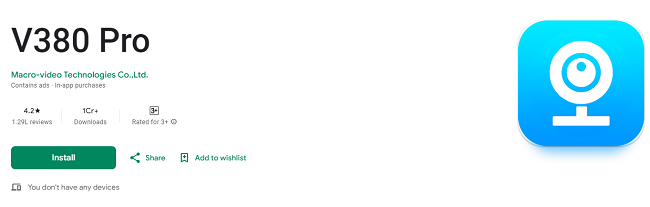
From the list of search results, locate the app titled V380 Pro with the correct logo. Ensure the developer is listed as Macrovideo to avoid downloading a counterfeit version.
Step 4: Tap “Install.”
Click the Install button, and the app will start downloading. The installation process may take a few minutes, depending on your internet speed.
Step 5: Open the App.
Once the installation is complete, tap the Open button to launch the app, or find it in your app drawer to open it later.
2. Downloading the App on iOS Devices
For iPhone or iPad users, here’s how to download the V380 Pro app:
Step 1: Open the Apple App Store.
Locate the App Store on your device’s home screen.
Step 2: Search for the App.
Tap the search icon and enter “V380 Pro” in the search field.
Step 3: Select the Correct App.
Look for the official V380 Pro app by Macrovideo in the search results. Check the app description and user reviews to ensure authenticity.
Step 4: Tap “Get” or the Download Icon.
Click the Get button next to the app. If prompted, confirm your Apple ID credentials or use Face ID/Touch ID to authorize the download.
Step 5: Launch the App.
After the download and installation are complete, tap Open to start using the app.
3. Downloading the App for PC or Mac
While the V380 Pro app is primarily designed for mobile devices, you can use it on a PC or Mac through emulators such as BlueStacks or NoxPlayer. Here’s how:
Step 1: Download an Android Emulator.
Visit the official website of BlueStacks or NoxPlayer and download the emulator for your PC or Mac.
Step 2: Install the Emulator.
Follow the on-screen instructions to install the emulator on your system.
Step 3: Open the Emulator and Access Google Play Store.
Launch the emulator and log in with your Google account to access the Play Store.
Step 4: Search and Install the V380 Pro App.
Use the search bar to find the V380 Pro app, then click Install to download it to your emulator.
Step 5: Open and Use the App.
Once installed, launch the app from within the emulator and set it up to start monitoring.
Troubleshooting Common Issues
1. App Not Found on Play Store or App Store
If you can’t find the app, ensure:
Your device meets the compatibility requirements.
You’re connected to a stable internet connection.
You’ve entered the correct app name: “V380 Pro.”
2. Download Stuck or Slow
Restart your device and ensure you have a strong Wi-Fi or mobile data connection.
Clear the cache of the Play Store or App Store if the issue persists.
3. Installation Errors
Ensure there’s enough storage space on your device.
Check that your operating system is up-to-date.
4. App Crashing After Installation
Update the app to the latest version from the store.
Restart your device and try reopening the app.
Key Features After Download
Once you’ve downloaded and installed the app, here’s what you can do:
Add Your Cameras: Pair your cameras with the app using the QR code or Wi-Fi setup.
Customize Settings: Enable motion detection, set up alarms, or adjust video quality.
Monitor Live Feeds: Access live video streams from your cameras in real-time.
Review Recordings: View past footage stored on the camera’s SD card or cloud.
Enable Notifications: Get instant alerts for unusual activities or motion detection.
Why Download V380 Pro?
The V380 Pro app is a trusted solution for anyone looking to enhance their security. It’s designed for easy setup, making it suitable for both tech-savvy users and beginners. With features like cloud storage, voice talkback, and motion detection alarms, the app provides unparalleled convenience and safety.
Advantages of Downloading V380 Pro:
Ease of Use: Simple installation process and user-friendly interface.
Cross-Device Compatibility: Available on Android, iOS, and PCs via emulators.
Advanced Features: Includes cloud storage, two-way audio, and motion alerts.
Frequently Asked Questions
1. Is the V380 Pro app free to download?
Yes, the app is free to download on Android and iOS. However, some premium features, like extended cloud storage, may require a subscription.
2. Do I need an account to use the app?
Yes, you’ll need to create a free account to manage your devices and access all features.
3. Can I download the app on multiple devices?
Yes, you can install the app on multiple devices using the same account.
4. How much storage space does the app require?
The app is lightweight and typically requires less than 100MB of storage.
5. Is the app safe to use?
Yes, the V380 Pro app uses encrypted connections to protect your data and video feeds.
Conclusion
Downloading the V380 Pro app is the first step toward enhanced security and peace of mind. Whether you’re using an Android, iOS device, or even a PC, the process is simple and straightforward. With its advanced features and ease of use, the V380 Pro app is the perfect solution for keeping an eye on your property from anywhere in the world.
Start your journey to better security today by downloading the V380 Pro app from your preferred store!
Trending Now
Updates